4 February 2026
Totara v20: new features, integrations and reasons to upgrade

Jonny McAlister
Head of Customer Experience
See what’s new in Totara v20 – and decide whether it’s the right time to upgrade your LMS
Totara v20 is here, bringing with it an array of new features that make life easier for admins and learners alike.
Given that there are so many new features and enhancements, this latest version of Totara is undoubtedly the biggest new release in recent times. The improvements are broadly focused on helping you to create streamlined and intuitive workflows.
With all that in mind, if you’re thinking of changing or upgrading your LMS in the near future, upgrading to Totara v20 offers a great opportunity to maximise your investment in your platform.
Totara v20 benefits at-a-glance
We’ll dig into the new features shortly. But first, let’s look at the high-level improvements and enhancements offered by Totara v20.
- ✳️ Simplified compliance, with improved insights and new recertifications
- ✳️ Easier skills gap analysis through a series of new skills features
- ✳️ A suite of high-efficiency AI plugins
- ✳️ Streamlined workflows across key Totara features
- ✳️ More powerful search and content discovery functionality
So, what are the new features in Totara v20?
As we’ve said, there are a lot of improvements and enhancements in this Totara release. Some of the headline new features in Totara v20 include:
Multi-year recertification for smarter compliance
Complex, long-term compliance requirements are much easier to manage, thanks to Totara v20’s multi-year recertification pathways. Manage multi-year recertification cycles using multiple paths, certification expiry rules and reinstatement conditions.
The result is complete control when structuring, delivering and maintaining mandatory training across your organisation.
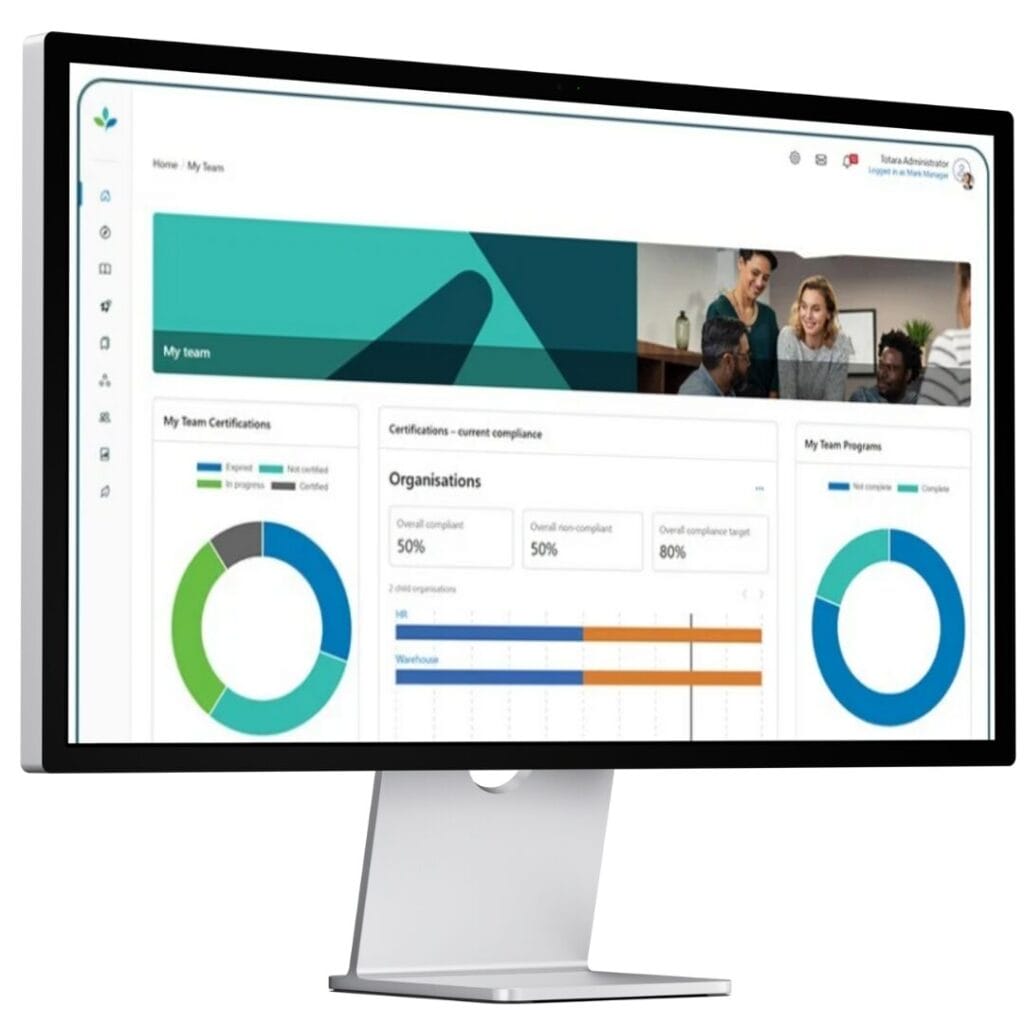
Compliance certification reporting block for at-a-glance insights
Quickly check compliance status across different teams with the new compliance certification reporting block. Display the new block prominently to give admins and managers an instant snapshot of certification and compliance rates.
The reporting block offers a simple visual overview and clear, actionable insights without creating or drilling down into full reports. provides an easy route to dig into that data when needed.
Easier self-enrolment to encourage learning and cut admin time
Totara v20 enables learners to enrol themselves on and withdraw themselves from courses and certifications. In previous Totara versions, admins had to approve requests to enrol or withdraw.
The new feature streamlines engagement and promotes self-directed learning. It also frees up admin time previously spent handling such requests.
Crucially, admins must enable this functionality and they retain control over which courses and certifications are suitable for self-enrolment and withdrawal.
Enhanced skills reporting for easier upskilling
Long built around the concept of competency frameworks, Totara has shifted its language for Totara v20. It now talks about skills rather than competencies. The change in terminology is accompanied by a series of upskilling features, including:
✅ Team skill proficiency block – See a clear overview of current skill levels within a team, giving managers at-a-glance insights to identify skills gaps and take action where needed.
✅ Clearer skills gap reporting – Get a snapshot of proficient vs not proficient status for all key skills, all delivered through clearer visuals and reporting options.
✅ Easier skills rating delegation – Assign responsibility for observing and rating competencies to supervisors and other trusted individuals, with the option to create audiences for skills rating.
✅ Skill proficiency audience type – Enable smarter enrolments and more effective internal recruitment by grouping learners by skill proficiency. Create new audiences of users with a defined proficiency in a specific skill.
Time-saving AI plugins
Totara v20 features four AI plugins to improve learning experiences and increase the efficiency of your L&D programme. The new AI features are:
✅ AI writing assistant – Automatically create, refine and summarise text within your LMS for greater consistency.
✅ AI image generation – Easily generate AI images within admin workflows to increase engagement.
✅ AI knowledge check-in – Share informal quizzes that are automatically created from your resources.
✅ AI SMART goal assistant – Share structured and specific SMART goals tailored to each learner’s personal development.

Time-saving workflows for easier admin
There are a whole host of improvements and enhancements in Totara v20 that make life easier for admins. Some of the smallest but most frequently requested have been adopted, including:
✅ Preview audience changes – See changes you’re making to an audience, including a clear overview of total users added and removed and a display of individual users’ statuses, before finalising the update.
✅ Refreshed audience rules layout – Improved navigation, layout and naming conventions make everything clearer when updating audience rules.
✅ See user status on profiles – See whether each user is active or suspended, displayed clearly next to their profile to avoid laborious searches.
✅ Background report exports – Navigate away from large reports and get on with other tasks while Totara v20 completes the export in the background.
✅ Date/Time field improvements – Date/Time fields are now empty – instead of being populated with a default value – and users are prompted to select a time and date before they can save changes.
Enhanced search for easier content discovery
Smarter content search functionality makes it easier for your learners to find the courses and resources they need. This includes partial word-matching, spell check suggestions and enhanced wildcard searches.
There’s also a more powerful recommended content engine to make it easier to explore your catalogue, while admins can exclude specific courses from the catalogue.
Digital check-in for smoother seminars
Learners can mark their own attendance for in-person and online events using secure links and QR codes. Save valuable admin time and reduce admin errors with Totara v20’s trackable check-in records. These are created directly by the learner but tied to user login and seminar events.
That means no more taking roll calls or manually entering attendance details. The bigger the seminar, the greater the resource savings.
Native webhooks for integrations
Supporting real-time, event-driven integrations. This makes it easier to automate processes and keep external systems in sync without relying on scheduled updates, including connections to HR systems, identity providers, CRMs, data and reporting platforms.
Ready to upgrade to Totara v20?
If you’d like to be among the first organisations to take advantage of the new features in Totara v20, get in touch. We’re Totara Platinum Alliance Partners and have been building learning platforms for more than 20 years.
Book a meeting with one of our learning technology experts to discuss your plans.